Garuda Linux Wallpaper
July 19th, 2025
What do you do if you want a desktop wallpaper that doesn’t exist? Ask an AI! This one matches my OS and Laptop color, looks great with Candy Icons too.
Stop the Screenshot Sound in Gnome
May 22nd, 2024
I find it so embarassing when I screenshot something and my laptop suddenly makes a loud camera noise, gives the impression I’m taking photos of the people around me!
Seems there isn’t an easy setting for this – gnome being gnome – but I did find this solution. As hacky as it is, it works!
sudo mv /usr/share/sounds/freedesktop/stereo/camera-shutter.oga \
/usr/share/sounds/freedesktop/stereo/silly-camera-shutter.oga
All The Laws
January 21st, 2024
Computing has certainly created a lot of “laws”. Unlike the laws of physics, remember they are up for debate. I find it annoying that very few people ask “why” regarding Moores Law for example. Just because Moores Law holds true for now, doesn’t mean in a million years it will be true. Gravity will be though.
Whether these things pass scientific scrutiny aside, most of them hold true and are pretty useful. Here they are in one place.
https://github.com/dwmkerr/hacker-laws
Nice work Dave Kerr 🙂
My TinyURL
January 12th, 2024https://github.com/mikelindner/bill.shorten
After talking with a friend about building a secure site to shorten links I came up with this thing I called “Bill Shorten”
It’s pretty simple if you use AWS command line, and it’s as secure as your AWS account, so all the best there 😅.
The basic parts, other than the script and associated files, is an S3 static hosting bucket and a static list of “random” numbers, words or whatever you like for your final short link. This way no code is needed to generate short links, and more importantly to prevent double usage. In the even…
Read more…
Screen Rotation for XFCE
June 14th, 2022One thing I haven’t been able to find a tool to do is set my convertible laptop (HP Dragonfly Elite) to rotate in XFCE. Gnome does it out of the box, but I’m not a fan of Gnome.The script is deceptively small, but it takes a very long time to find all the required information. I hope it’s helpful for someone! I’ve included links in the comments so if you have a slightly different machine this might help you modify it yourself.In XFCE I’ve just added it to Session and Startup, where it quietly runs in the background.You can find the latest version of the script here.
#!/bin/sh
# autorotate.sh
# Automatically rotate screen based on device orientation
# For XFCE
# https://github…
Read more…
Disable middle click on Synaptics touchpads
January 7th, 2022I’ve just moved back to a Linux laptop, specifically Arch Linux, using XFCE4 on an HP Dragonfly Elite, after a few years trying Mac. Totally love it, the full Linux experience without trying to be MacOS.
One thing that did annoy me was the touchpad was set to have three “buttons” or click areas along the bottom. This meant if I went to choose a browser tab, sometimes I’d miss the left edge button and hit the middle button closing the tab. Annoying.
These are the steps I used to set it to be one longer Left button with no right button.
~ 🐠 yay -S xorg-xinput
~ 🐠 xinput
⎡ Virtual core pointer id=2 [master pointer (3)]
⎜ ↳ Virtual c…
Read more…
Shell Fun
December 2nd, 2019
I love the Linux shell – it’s one of the top reasons to use Linux.
This post lists some geeky additions to make your shell an absolute joy to live in.
zsh
When I first heard that MacOS was moving to zsh I rolled my eyes. Apple’s bash is truly appalling so it sounded like putting lipstick on a pig. Now that I’ve tried it for real (on Linux) I can see it’s really quite an awesome shell and I’ve been converted.
Warning: There does seem to be a bug in the up-arrow history, it forgets where the string starts or something… this might just be my machine, but look out for it and if it bugs you too much just revert to bash.
Getting started is simple, although wait until you in…
Read more…
Shell Fun II – The Geekening
December 1st, 2019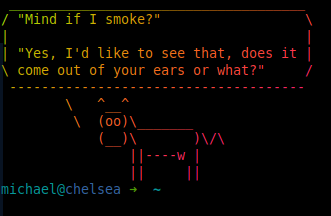
Ok, now you have the best shell going, it’s time to add some bling. None of these products really rely on zsh but while we’re tweaking the shell it’s a good time to cow things up 😉
cowsay
Everyone needs a message delivered via ascii art cow right?
sudo apt install cowsay
Hint: You can also use cowthink, just in case you want the cow to use it’s inside voice 😉
lolcat
Nothing to do with the memes, this is just “cat” but with extra lolz. It’s a ruby jem, if you don’t know what that is please search for it. I’m guessing most people reading my site do.
Basically lolcat outputs text in a rainbow. In small doses it’s quite nice.
gem ins…
Read more…
Short Version of Macbook Camera on Ubuntu
October 27th, 2019git clone https://github.com/patjak/bcwc_pcie.git
cd bcwc_pcie
make
sudo make install
sudo depmod
sudo modprobe -r bdc_pci
sudo modprobe facetimehd
“Night Mode” for Ubuntu
October 8th, 2019One of the things I liked with MacOS was night mode in the evenings. This is where it shifts the colour temperature of the display to a warmer (more red) colour temperature.
Redshift is the package for Ubuntu that does this.
sudo apt install -y redshift-gtkredshift-gtk &
Once you have that running click on the icon that appears and select Autostart
in ~/config/resdhift.conf add something like this (it’s for Melbourne AU)
[redshift]temp-day=6500temp-night=3700location-provider=manual
[manual]lat=-37.8136lon=144.9631
One shot color change:
redshift -O 3700
Reset to normal:
redshift -x
Find your latitude and longitude (to set sunrise and sunset) here:
Read more…
Facetime HD Camera with Ubuntu 19.04
September 30th, 2019Put the following script into /etc/kernel/postinst.d/99-install-facetime-camera.sh which will update each time the kernel gets updated, then run once “/etc/kernel/postinst.d/99-install-facetime-camera.sh $(uname -r)” to start it. I needed to reboot before it worked.#!/bin/bashset -e
export CONFIG_MODULE_SIG=nexport CONFIG_MODULE_SIG_ALL=nexport KERNELRELEASE=${1}
echo “Installing FacetimeHD camera for $KERNELRELEASE”cd /tmpgit clone https://github.com/patjak/bcwc_pcie.gitcd bcwc_pcie/firmwaremakemake installcd ..makemake installrm -rf /tmp/bcwc_pcie
if [ ! -d “/etc/modules-load.d” ]; thenmkdir -p “/etc/modules-load.d”fi
cat > “/etc/modules-load.d/facetimehd.conf” &l…
Read more…
Free Space Error – MacOS
May 1st, 2019May 1st, 2019
Every now and then I’ll move some huge file, a 40GB VM or something and various programs don’t show the space it was in as free. Confusingly some do. df -h shows the wrong free space while “About This Mac” is right.
Apparently, this is a TimeMachine problem!
This command fixed it for me as per the article below.
sudo tmutil thinLocalSnapshots / 10000000000 4
Thanks, Digital Trauma: https://apple.stackexchange.com/a/323455
Great Cheat Sheet add-on for any UNIX System!
April 22nd, 2019Install the script with this line:
sudo curl https://cht.sh/:cht.sh > /usr/local/bin/cht.sh \&& sudo chmod +x /usr/local/bin/cht.sh
Then try these for an example:
cht.sh tar
cht.sh perl/execute
curl cht.sh
It does what it says on the box!
iRack
April 28th, 2017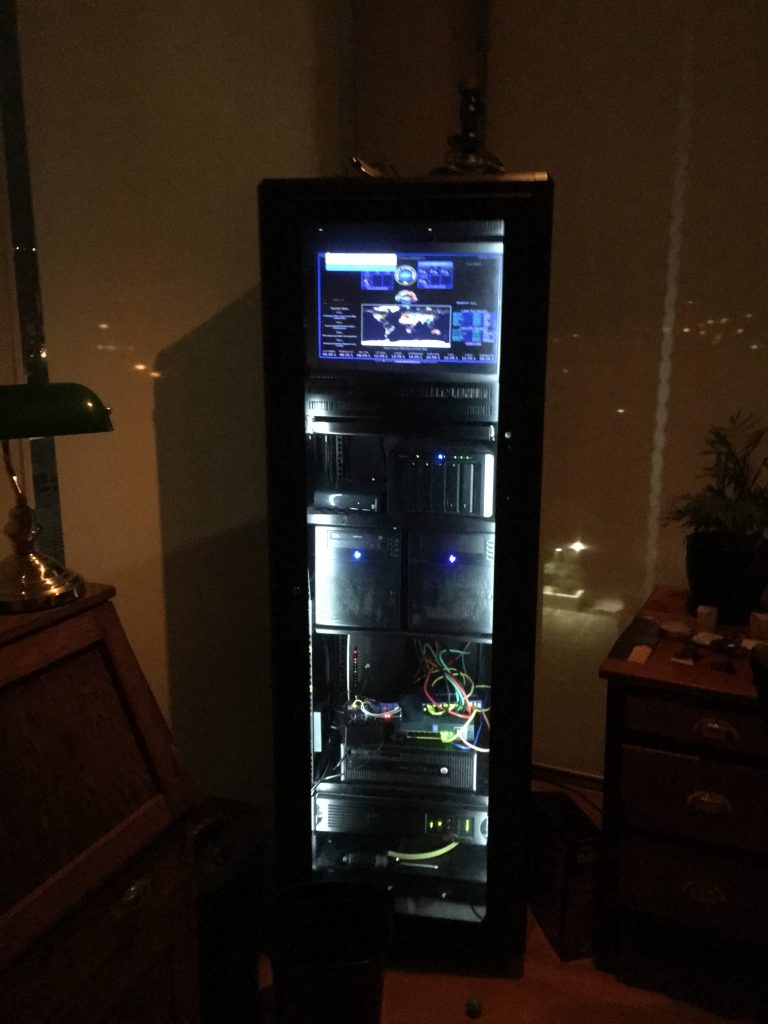
I got this from Paramount Browns in Adelaide in the late 90s or something. It was $50 and a complete mess. It came with a bunch of what it previously housed – PLCs and other control stuff, but something had caught on fire and someone had belted it with a fire extinguisher!
Over the years I painted it black (it was 90s computer off white), added the tinted perspex, LED light strips, cooling fans, Raspberry Pi based climate monitoring and fan control, shelves, monitor mounts, and of course all the hardware inside.
The disappointing part was that the PLCs were all fine, but they were Honeywell and that company have a policy of only giving out manuals to initial purchasers, so I could…
Read more…
OpenStack Concept Diagram
January 29th, 2015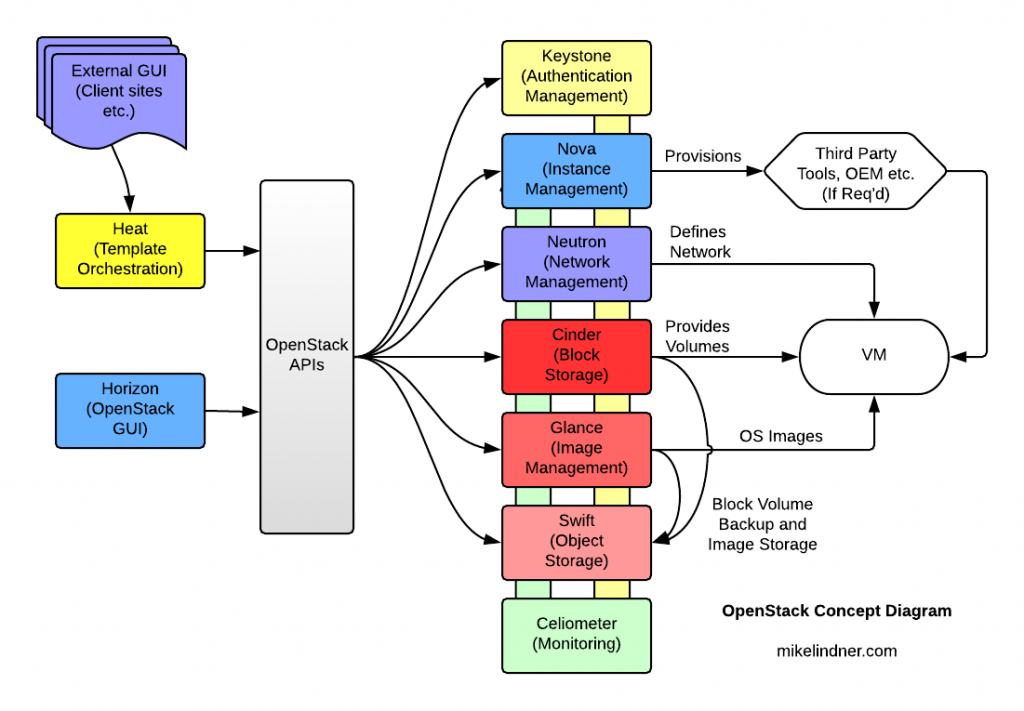
I produced this a few years ago at IBM to simplify the explanation of how OpenStack does what it does. This is for explaining it to semi technical “suits”, so it’s rather simplified. I couldn’t find a simple diagram to show what is going on it a similar fashion.
Categories
- Cloud & DevOps
- Computing History
- Hardware & Projects
- Linux & Unix
- Random
- Telecommunications
- Vintage Computing