Disable Missed Call Spam on Telstra Prepaid
November 29th, 2025
My phone shows missed calls like every other phone in the world. It also accepts SMS messages from people that WANT to send them. I hate checking messages and always get them too late, I also hate “you missed a call but the caller did not leave a message” texts, and I never like to “leave a short ten second message and it will be sent as a text”. SO I just spend over an hour working this all out.
dial #002#
dial **61*101**30#
SMS “DCF OFF” to 144
Garuda Linux Wallpaper
July 19th, 2025
What do you do if you want a desktop wallpaper that doesn’t exist? Ask an AI! This one matches my OS and Laptop color, looks great with Candy Icons too.
One for the AI Phobic
April 26th, 2025
Here’s one for all the people that think AI is some kind of threat or fad. I’ve heard uninformed and uninspired people say this my whole life about every step of computing. So far the world hasn’t ended and the sky hasn’t fallen in. “But this time is different” – yeah they always said that too.
Literally some people said that libraries moving from physical card based catalogues, in wooden cabinets, to searchable computer based catalogues, would be the end of decent research. Then the personal computer, then the Internet, then search engines. Blah Blah, makes you almost wish computers would hurry up then, and end humanity for real!
My Apples
April 25th, 2025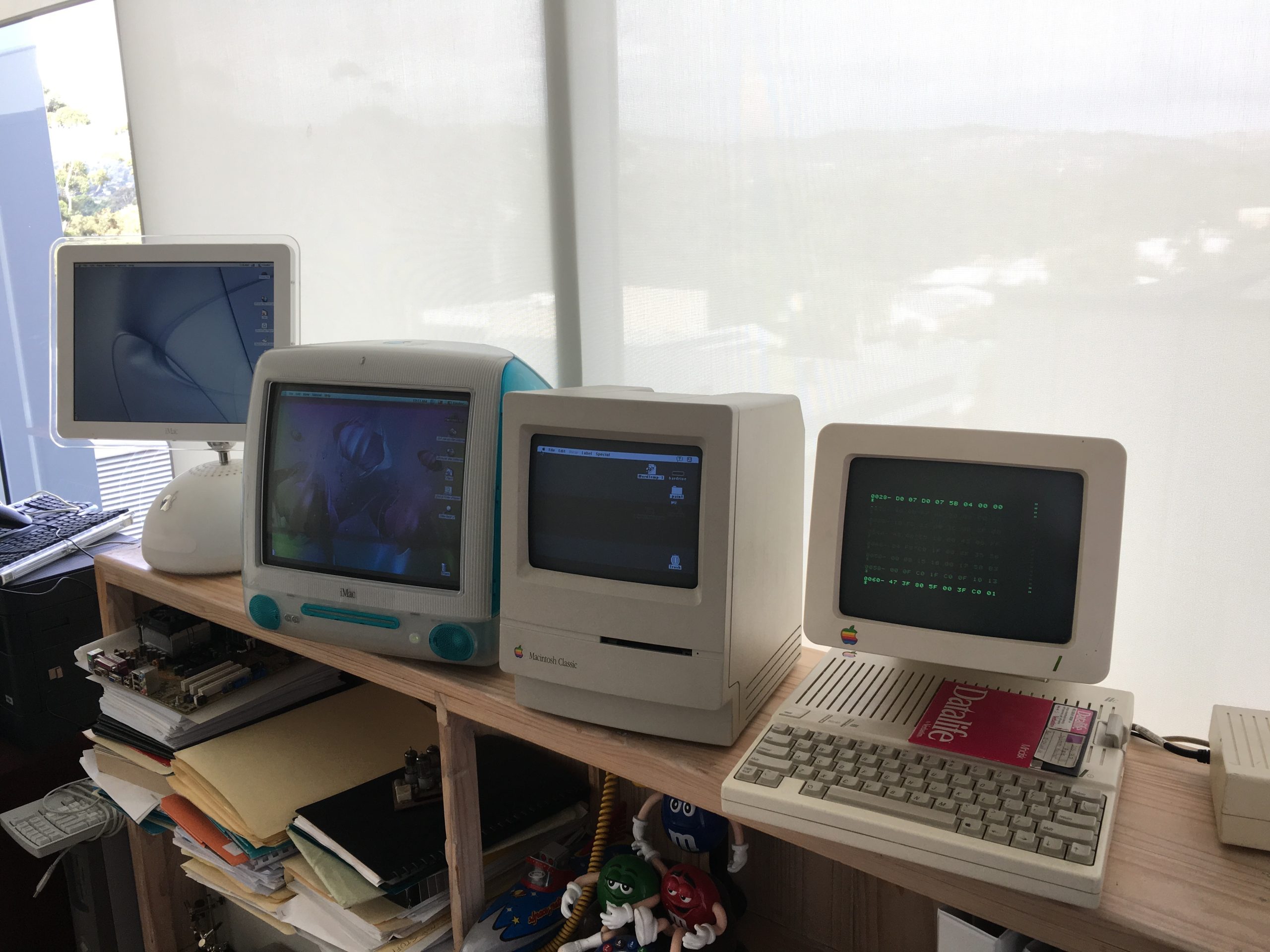
I’ve been collecting these for a while, bought a lot more than these and threw a few away, these are the best of my collection. Not an Apple fanatic, I like them, but they’re just another computer company to me, one that has certainly earned it’s place in computing history. The “iLamp” model on the far left actually has a circular motherboard! I like them because back before iMacs all looked the same they were very creative in their design. That 80s (IIc) one, far right, was super leet back in it it’s day. Can you believe that 5.25″ floppy (IBM invention) only stored 1.2MB!
Of course I’d like an Apple 1, but apparently only 200 were made and only 20 still exist in working order! I’ll ha…
Read more…
Apple IIc in Film
April 25th, 2025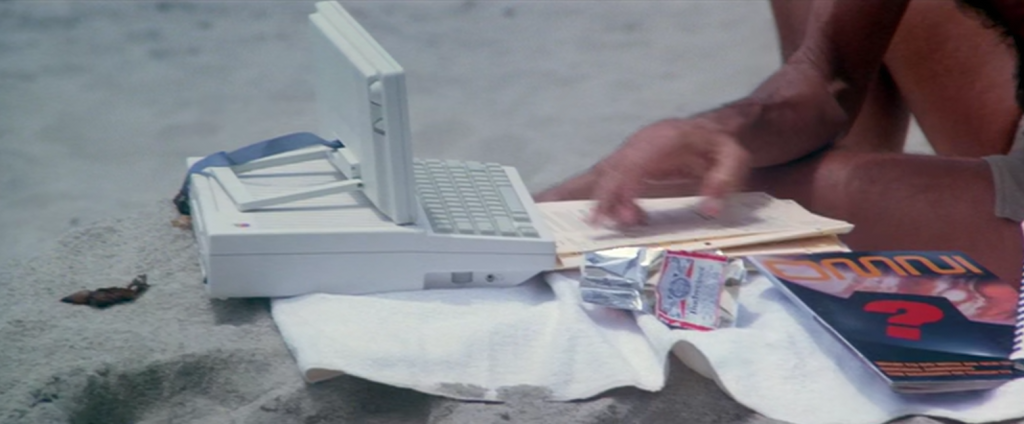
Apple IIc in the 1984 adaptation of Arthur C. Clarke’s “2010 – The Year We Make Contact” – Roy Schneider playing Heywood Floyd preparing to go to Jupiter, using an Apple IIc with a portable screen on the beach.
Note computers had neither portable screens, nor batteries in the 80s, and really wouldn’t like damp sand, however it’s a good example of how futuristic they seemed – this was “40 years into the future”. In retrospect it’s rather huge for a portable computer of 2010!
It’s also a great example of how good Steve Jobs was at marketing. It was only Apple’s second commercial model and it got product placement in a major hollywood film!
Also note we haven’t gone to Jupiter ye…
Read more…
Stop the Screenshot Sound in Gnome
May 22nd, 2024
I find it so embarassing when I screenshot something and my laptop suddenly makes a loud camera noise, gives the impression I’m taking photos of the people around me!
Seems there isn’t an easy setting for this – gnome being gnome – but I did find this solution. As hacky as it is, it works!
sudo mv /usr/share/sounds/freedesktop/stereo/camera-shutter.oga \
/usr/share/sounds/freedesktop/stereo/silly-camera-shutter.oga
All The Laws
January 21st, 2024
Computing has certainly created a lot of “laws”. Unlike the laws of physics, remember they are up for debate. I find it annoying that very few people ask “why” regarding Moores Law for example. Just because Moores Law holds true for now, doesn’t mean in a million years it will be true. Gravity will be though.
Whether these things pass scientific scrutiny aside, most of them hold true and are pretty useful. Here they are in one place.
https://github.com/dwmkerr/hacker-laws
Nice work Dave Kerr 🙂
My TinyURL
January 12th, 2024https://github.com/mikelindner/bill.shorten
After talking with a friend about building a secure site to shorten links I came up with this thing I called “Bill Shorten”
It’s pretty simple if you use AWS command line, and it’s as secure as your AWS account, so all the best there 😅.
The basic parts, other than the script and associated files, is an S3 static hosting bucket and a static list of “random” numbers, words or whatever you like for your final short link. This way no code is needed to generate short links, and more importantly to prevent double usage. In the even…
Read more…
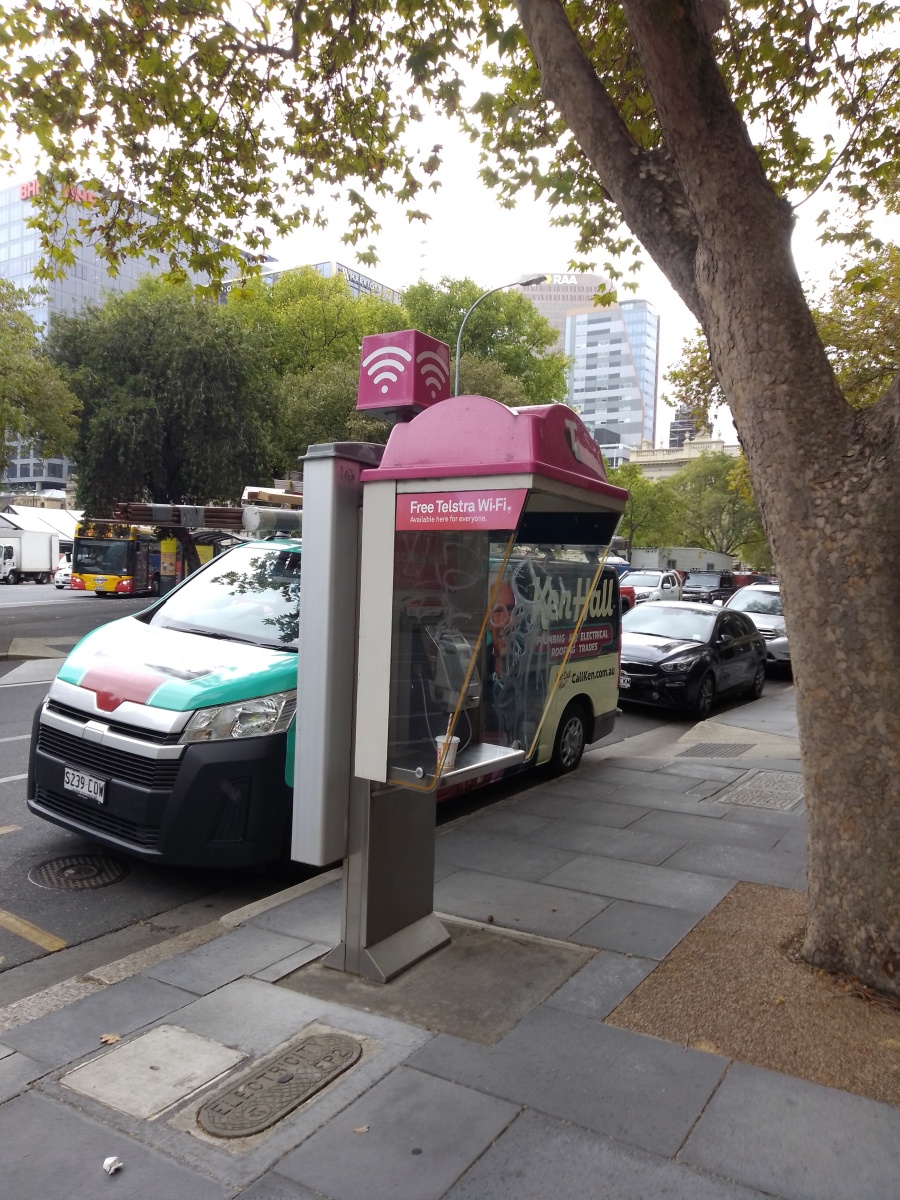
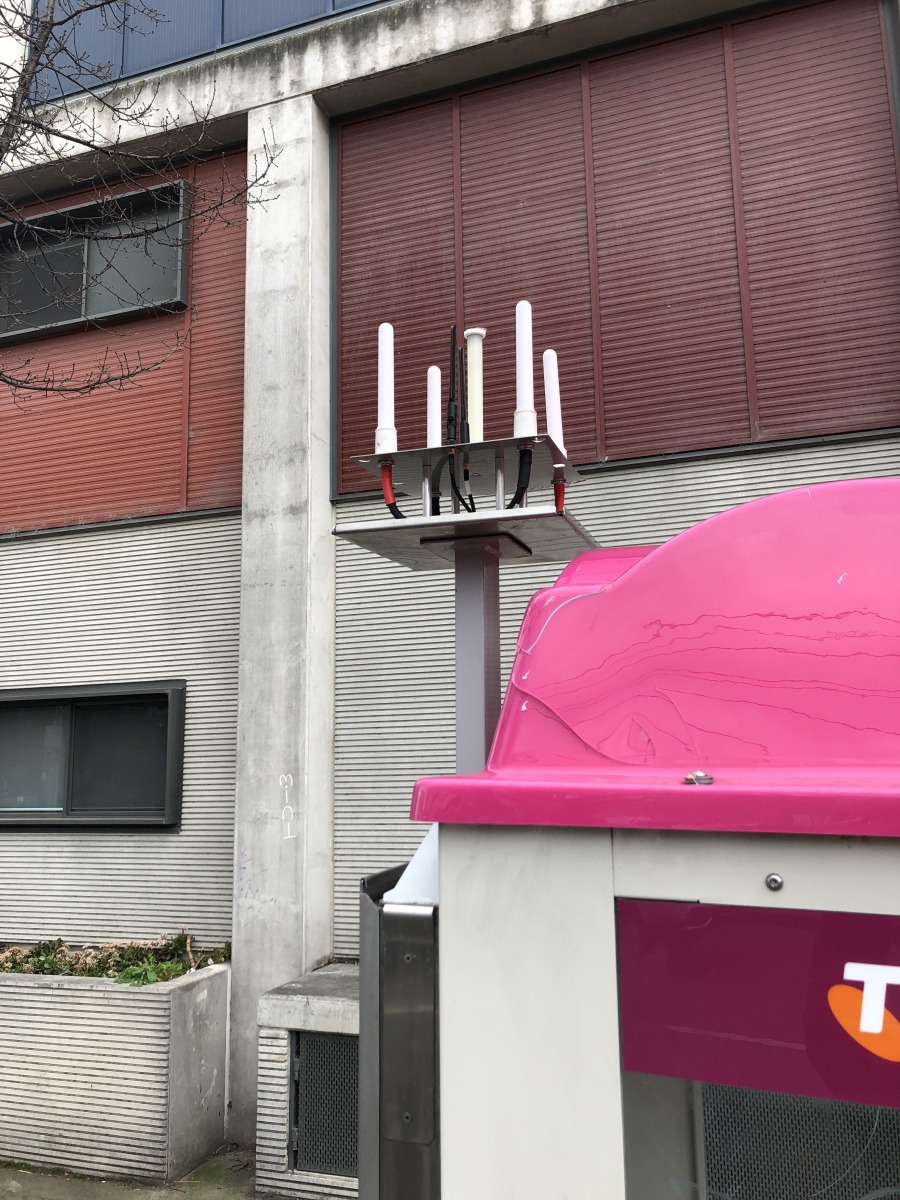
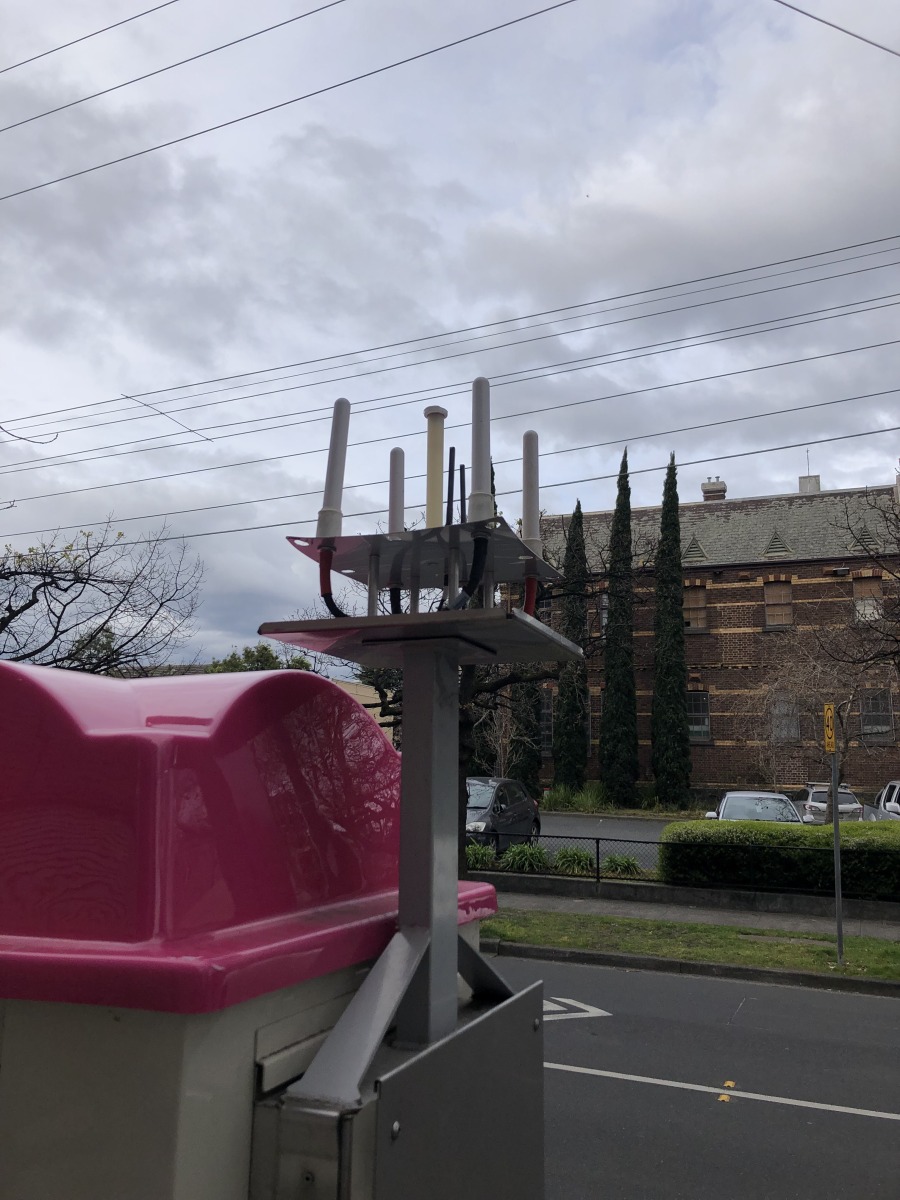
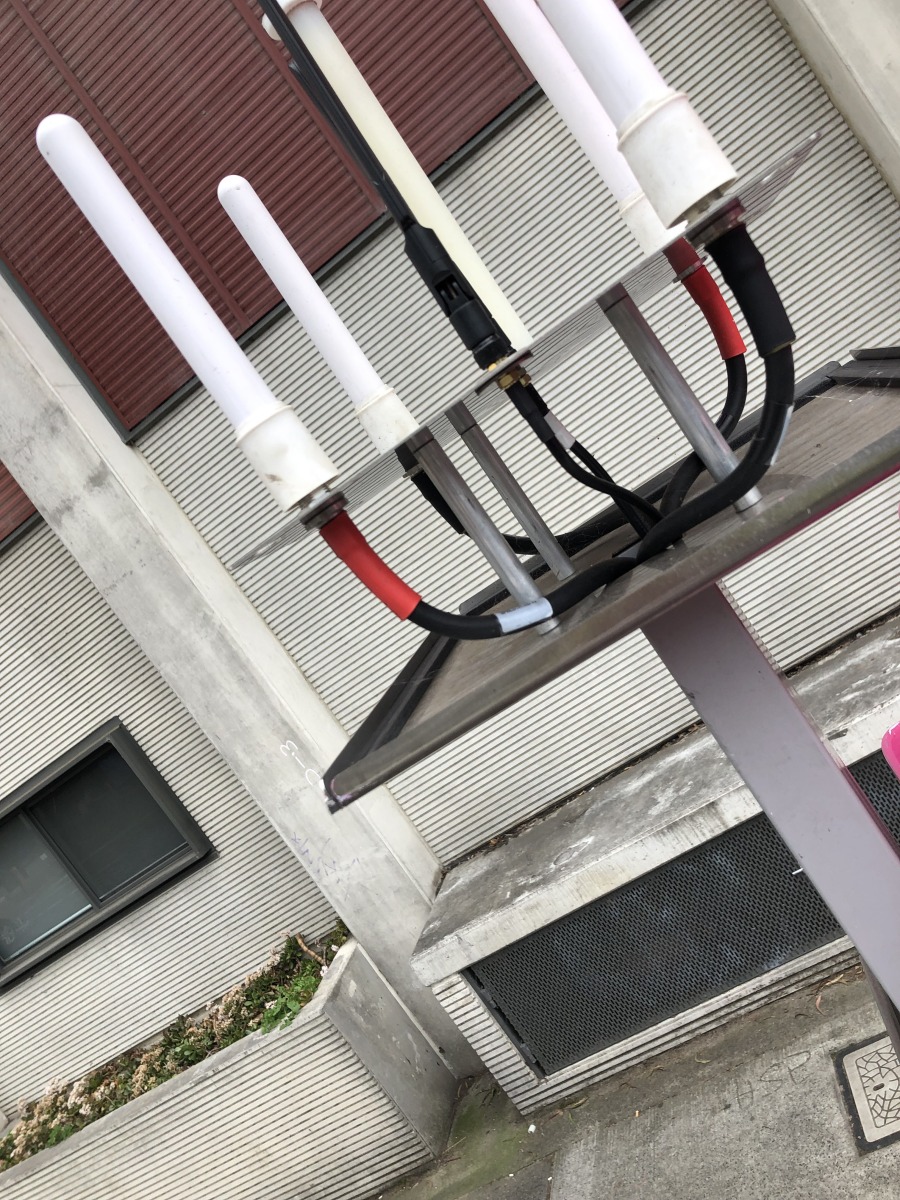
Inside a Telstra WiFi Hotspot
August 15th, 2023Here’s one of those pink boxes on payphones with it’s cover removed.
Screen Rotation for XFCE
June 14th, 2022One thing I haven’t been able to find a tool to do is set my convertible laptop (HP Dragonfly Elite) to rotate in XFCE. Gnome does it out of the box, but I’m not a fan of Gnome.The script is deceptively small, but it takes a very long time to find all the required information. I hope it’s helpful for someone! I’ve included links in the comments so if you have a slightly different machine this might help you modify it yourself.In XFCE I’ve just added it to Session and Startup, where it quietly runs in the background.You can find the latest version of the script here.
#!/bin/sh
# autorotate.sh
# Automatically rotate screen based on device orientation
# For XFCE
# https://github…
Read more…
Why can’t computers use registers as RAM?
March 14th, 2022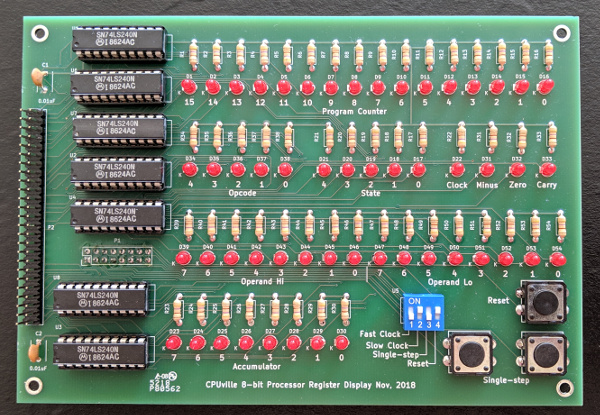
I’ve always asked this, and still need to remind myself why every now and then, so I’m posting this link to save myself the hassle of looking it up again in ten years haha.
https://stackoverflow.com/questions/3798730/can-we-have-a-computer-with-just-registers-as-memory
Terraform Website in a Box (of code)
January 21st, 2022Here’s a simple example of how to create a rock solid site in Terraform, this uses Terraform Cloud, which HashiCorp recommends. I tend to agree, although vendor lock-in and HCL is something that should consider.
It’s basically an s3 bucket behind all the stuff needed for a CloudFront CDN. It’s not hard to swap out the static s3 site for something more substantial, using this code as a starting point. Remove all my junk, I like to amuse myself with ascii graphics and stuff in code. Keeps it real.
#####
##### Make a website as simply as possible.
#####
terraform {
cloud {
organization = “FremantleTechnology”
workspaces {
name = “mykl-rocks”
}
}
required_pro…
Read more…
Disable middle click on Synaptics touchpads
January 7th, 2022I’ve just moved back to a Linux laptop, specifically Arch Linux, using XFCE4 on an HP Dragonfly Elite, after a few years trying Mac. Totally love it, the full Linux experience without trying to be MacOS.
One thing that did annoy me was the touchpad was set to have three “buttons” or click areas along the bottom. This meant if I went to choose a browser tab, sometimes I’d miss the left edge button and hit the middle button closing the tab. Annoying.
These are the steps I used to set it to be one longer Left button with no right button.
~ 🐠 yay -S xorg-xinput
~ 🐠 xinput
⎡ Virtual core pointer id=2 [master pointer (3)]
⎜ ↳ Virtual c…
Read more…
Telstra During Lockdown
August 10th, 2021This is a typical floor at Telstra’s Exhibition Street Headquaters.
Usually it’s hard to find a desk here, the lunchrooms, meeting rooms and lobby are all full, there’s a bit of a wait for one of the twenty lifts and there is a constant stream of people going through the gates. It’s not even this empty in the middle of the night!
There are 45 floors just like this. Instead of thousands of people at “242”, there were like 10 – 20 max, probably the time I most felt alone during lockdown, it was weird because it’s usually a really active, chatty place
Shell Fun
December 2nd, 2019
I love the Linux shell – it’s one of the top reasons to use Linux.
This post lists some geeky additions to make your shell an absolute joy to live in.
zsh
When I first heard that MacOS was moving to zsh I rolled my eyes. Apple’s bash is truly appalling so it sounded like putting lipstick on a pig. Now that I’ve tried it for real (on Linux) I can see it’s really quite an awesome shell and I’ve been converted.
Warning: There does seem to be a bug in the up-arrow history, it forgets where the string starts or something… this might just be my machine, but look out for it and if it bugs you too much just revert to bash.
Getting started is simple, although wait until you in…
Read more…
Shell Fun II – The Geekening
December 1st, 2019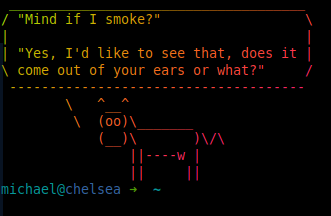
Ok, now you have the best shell going, it’s time to add some bling. None of these products really rely on zsh but while we’re tweaking the shell it’s a good time to cow things up 😉
cowsay
Everyone needs a message delivered via ascii art cow right?
sudo apt install cowsay
Hint: You can also use cowthink, just in case you want the cow to use it’s inside voice 😉
lolcat
Nothing to do with the memes, this is just “cat” but with extra lolz. It’s a ruby jem, if you don’t know what that is please search for it. I’m guessing most people reading my site do.
Basically lolcat outputs text in a rainbow. In small doses it’s quite nice.
gem ins…
Read more…
Short Version of Macbook Camera on Ubuntu
October 27th, 2019git clone https://github.com/patjak/bcwc_pcie.git
cd bcwc_pcie
make
sudo make install
sudo depmod
sudo modprobe -r bdc_pci
sudo modprobe facetimehd
“Night Mode” for Ubuntu
October 8th, 2019One of the things I liked with MacOS was night mode in the evenings. This is where it shifts the colour temperature of the display to a warmer (more red) colour temperature.
Redshift is the package for Ubuntu that does this.
sudo apt install -y redshift-gtkredshift-gtk &
Once you have that running click on the icon that appears and select Autostart
in ~/config/resdhift.conf add something like this (it’s for Melbourne AU)
[redshift]temp-day=6500temp-night=3700location-provider=manual
[manual]lat=-37.8136lon=144.9631
One shot color change:
redshift -O 3700
Reset to normal:
redshift -x
Find your latitude and longitude (to set sunrise and sunset) here:
Read more…
Facetime HD Camera with Ubuntu 19.04
September 30th, 2019Put the following script into /etc/kernel/postinst.d/99-install-facetime-camera.sh which will update each time the kernel gets updated, then run once “/etc/kernel/postinst.d/99-install-facetime-camera.sh $(uname -r)” to start it. I needed to reboot before it worked.#!/bin/bashset -e
export CONFIG_MODULE_SIG=nexport CONFIG_MODULE_SIG_ALL=nexport KERNELRELEASE=${1}
echo “Installing FacetimeHD camera for $KERNELRELEASE”cd /tmpgit clone https://github.com/patjak/bcwc_pcie.gitcd bcwc_pcie/firmwaremakemake installcd ..makemake installrm -rf /tmp/bcwc_pcie
if [ ! -d “/etc/modules-load.d” ]; thenmkdir -p “/etc/modules-load.d”fi
cat > “/etc/modules-load.d/facetimehd.conf” &l…
Read more…
Free Space Error – MacOS
May 1st, 2019May 1st, 2019
Every now and then I’ll move some huge file, a 40GB VM or something and various programs don’t show the space it was in as free. Confusingly some do. df -h shows the wrong free space while “About This Mac” is right.
Apparently, this is a TimeMachine problem!
This command fixed it for me as per the article below.
sudo tmutil thinLocalSnapshots / 10000000000 4
Thanks, Digital Trauma: https://apple.stackexchange.com/a/323455
IBM Z
May 1st, 2019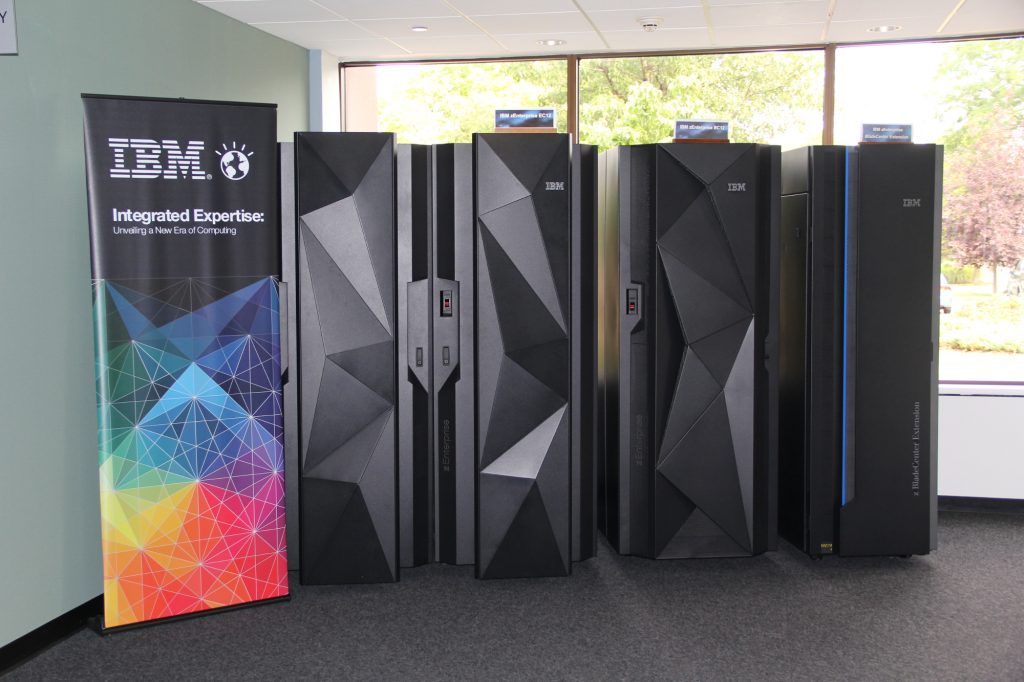
z14
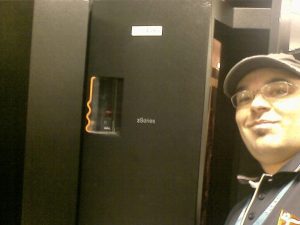
The dual frame z14, launched in July 2017, and the single frame z14, launched in April 2018, are based on the z14 chip, a 10-core processor running at 5.2 GHz. A z14 system can have a maximum of 240 Processing Unit (PU) cores, 170 of which can be configured to the customer’s specification to run applications and operating systems, and up to 32 TB usable redundant array of independent memory (RAIM), some of which can be configured as Virtual Flash Memory (VFM). Each PU can be characterized as a Central Processor (CP), Integrated Firmware Processor (IFP), Integrated Facility for Linux (IFL) processor, Integrated Information Processor (zIIP), Internal Coupling Facility (ICF) processor…
Read more…
Great Cheat Sheet add-on for any UNIX System!
April 22nd, 2019Install the script with this line:
sudo curl https://cht.sh/:cht.sh > /usr/local/bin/cht.sh \&& sudo chmod +x /usr/local/bin/cht.sh
Then try these for an example:
cht.sh tar
cht.sh perl/execute
curl cht.sh
It does what it says on the box!
iRack
April 28th, 2017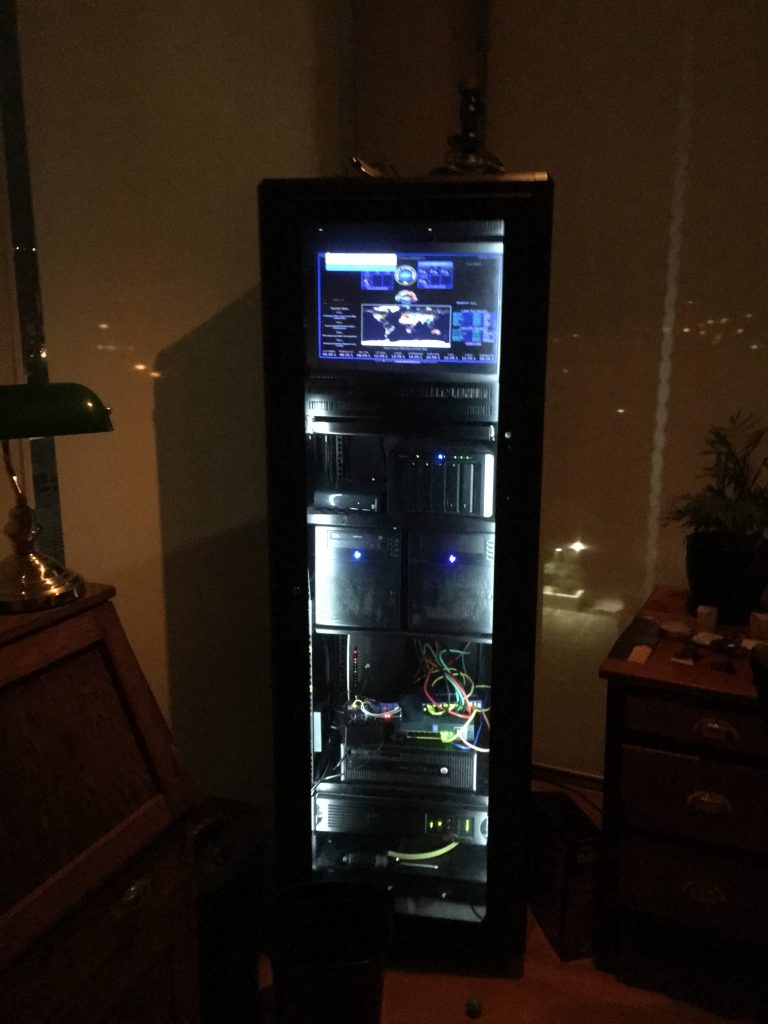
I got this from Paramount Browns in Adelaide in the late 90s or something. It was $50 and a complete mess. It came with a bunch of what it previously housed – PLCs and other control stuff, but something had caught on fire and someone had belted it with a fire extinguisher!
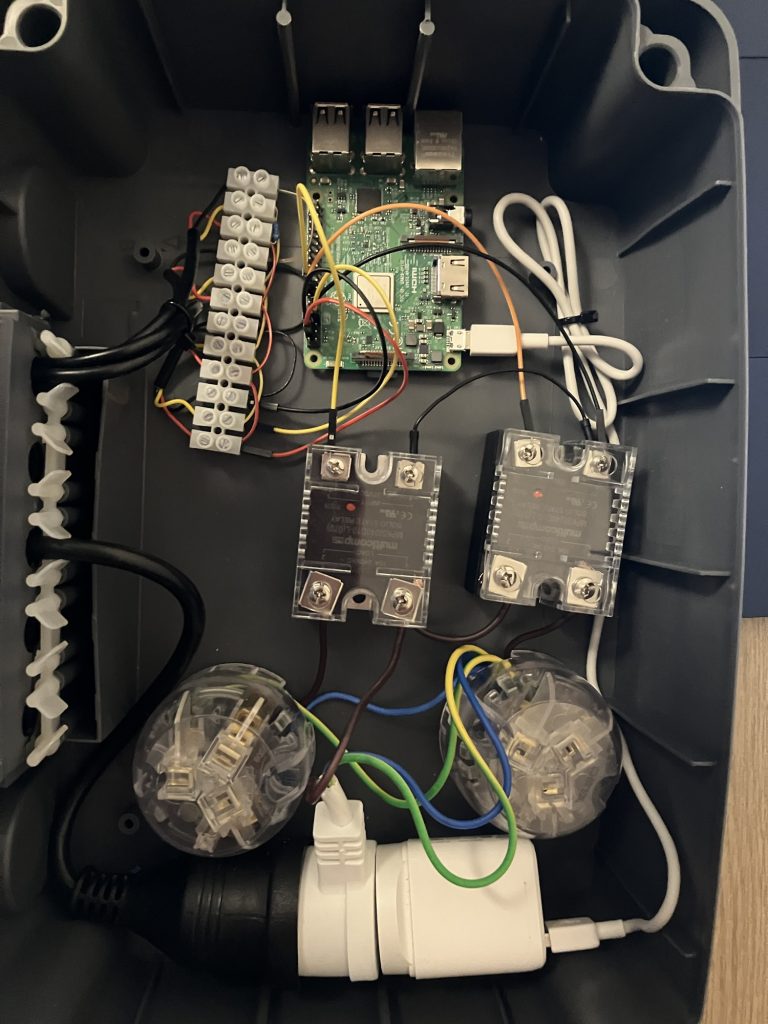
Over the years I painted it black (it was 90s computer off white), added the tinted perspex, LED light strips, cooling fans, Raspberry Pi based climate monitoring and fan control, shelves, monitor mounts, and of course all the hardware inside.
The disappointing part was that the PLCs were all fine, but they were Honeywell and that company have a policy of only giving out manuals to initial purchasers, so I could…
Read more…
OpenStack Concept Diagram
January 29th, 2015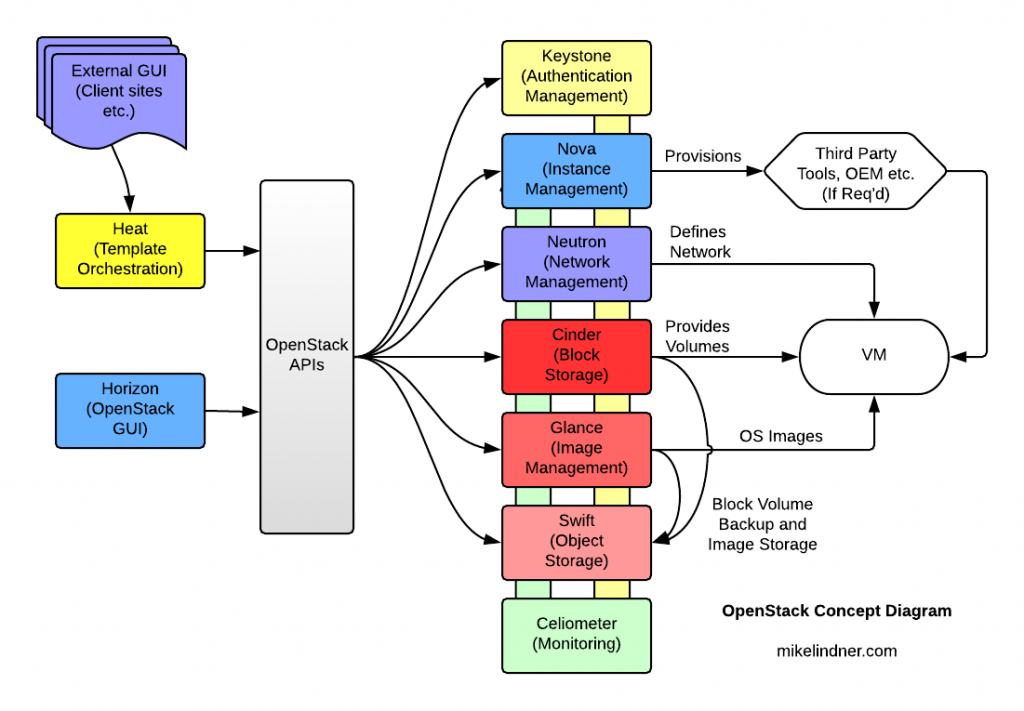
I produced this a few years ago at IBM to simplify the explanation of how OpenStack does what it does. This is for explaining it to semi technical “suits”, so it’s rather simplified. I couldn’t find a simple diagram to show what is going on it a similar fashion.
Arcade Restoration
April 24th, 2011I’ve added a gallery of all the pictures taken when restoring an original 80s arcade unit. I tried to reuse as many items as I could, the controller unit was hacked out of an old keyboard, I used a CRT monitor to try and keep the original look of the machine (drove out to the country to find one!), the speaker literally came from the side of the road, the motherboard, disk and power supply were out of some random old computer. The only bought items were the small amplifier module for the speaker and of course it needed new buttons and joystick.
The biggest thrill for me I think was when the coin mechanism was working again and wired in.
The pictures are pretty much in the order the
Lian Li 777
November 4th, 2009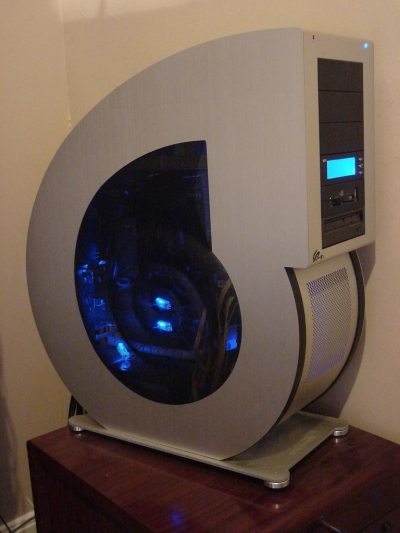
People seem to either love them or hate them. This is mine and I love it 🙂
One day I plan to mount it on a metal plinth, I just love unusual shaped computers (Seymore Cray has always been a personal hero), and with 12 disk bays, mega easy access, mesh sides for breezy cooling… what’s not to love!
First Student WiFi, Adelaide University
March 25th, 2002
One claim to fame, I installed the first student wifi in Adelaide Uni in 2002, now it’s part of normal university inffrastructure and totally taken for granted! Here’s a picture of a friend’s daughter “using” it… note the external PCMCIA* wifi card hanging out the side, literally laptops didn’t have wifi built in back then!
*People Can’t Memorise Computer Industry Acronyms 😉
Categories
- Cloud & DevOps
- Computing History
- Hardware & Projects
- Linux & Unix
- Random
- Telecommunications
- Vintage Computing